
File Form 1099-G Easily with Tax2efile
Use Form 1099-G to report federal, state, or local government payments for unemployment compensation, income tax refunds, RTAA payments, and more.

Simple Steps to E-File Form 1099-G
 Register with Tax2efile
- Provide Required Tax Information
- Submit Your Form to IRS
Why Choose Tax2efile?
- Quick, Secure, and Reliable Platform
- Easy Bulk Filing Feature & Premium Service
- Unified Platform for All Your Tax E-Filing Needs
E-File Form 1099-G Online with Tax2efile
The process of filing tax returns can be cumbersome, but filing your Form 1099-G for certain government payments can be easily done with Tax2efile. As an IRS-authorized e-filing service provider, we offer a seamless, secure, and user-friendly platform aimed at eliminating the stress of filing government income. Regardless of whether you are filing for unemployment compensation, state tax refunds, or any other taxable grants, we make sure that your filing is precise and timely.

What is Form 1099-G?
Form 1099-G is used to report certain government payments made by federal, state, and local government agencies. Some common government payments include non-employment compensation, refunds of state or local income taxes, certain taxable grants, and agricultural payments.
The government agency that makes the payment, or the person who files for the agency, submits Form 1099-G to the IRS and provides a copy of the statement to the recipient when required. If you received the Form 1099-G, use that Form to prepare your income tax return. You do not file another Form 1099-G just because you received one.
Who is Required to File Form 1099-G?
Form 1099-G is generally filed by the government unit responsible for a reportable payment, or by an authorized person filing on its behalf. Whether the form is required depends on the type and amount of payment, along with the IRS instructions for that tax year.
- Unemployment compensation and certain similar benefits.
- State or local income tax refunds, credits, or offsets.
- Reemployment Trade Adjustment Assistance payments.
- Certain taxable grants (Box 6) and agricultural payments.
- Applicable government-paid family leave benefits.
How to E-File Form 1099-G Online with Tax2efile?
E-filing Form 1099-G with Tax2efile is straightforward. Keep your payer details, recipient information, and government payment records ready, then follow these four steps to file your return online.
- Step 1: Log In or Create an Account
Sign in to your Tax2efile account or register as a new user. Once logged in, select Form 1099-G from the dashboard to begin filing. - Step 2: Enter Your Payer Information
Provide the required payer details, including the government agency or organization name, mailing address, and Taxpayer Identification Number (TIN). - Step 3: Add Recipient and Payment Details
Enter the recipient’s name, address, and TIN. Then, provide the applicable government payment information, such as unemployment compensation, state or local tax refunds, or taxable grants. - Step 4: Review and Submit Form 1099-G
Check the entered information for accuracy. Once everything is correct, submit your Form 1099-G through Tax2efile for electronic filing with the IRS.
Form 1099-G Boxes Explained
Understanding what each box represents helps you enter the correct payment details and avoid errors when filing.
- Box 1 – Unemployment Compensation: Reports the total unemployment benefits paid to the recipient during the year, before any federal income tax was withheld.
- Box 2 – State or Local Income Tax Refunds, Credits, or Offsets: Shows state or local income tax refunds, credits, or offsets issued to the recipient during the year.
- Box 3 – Box 2 Amount Is for Tax Year: Identifies the tax year to which the refund, credit, or offset reported in Box 2 applies, when it differs from the current tax year.

- Box 4 – Federal Income Tax Withheld: Reports any federal income tax withheld from government payments, including voluntary withholding and applicable backup withholding.
- Box 5 – RTAA Payments: Shows payments made under the Reemployment Trade Adjustment Assistance (RTAA) program to eligible workers.
- Box 6 – Taxable Grants: Reports taxable grant payments made by government agencies to individuals or businesses.
- Box 7 – Agriculture Payments: Shows agricultural subsidy payments made by the U.S. Department of Agriculture (USDA) and other reportable agricultural payments.
- Box 8 – Trade or Business Income: A checkbox indicating whether the amount reported in Box 2 relates to an income tax that applies specifically to trade or business income.
- Box 9 – Market Gain: Reports market gains associated with the repayment of Commodity Credit Corporation (CCC) loans.
- Box 10 – Family Leave Benefits: Reports family leave benefits paid through a government-administered paid family and medical leave program, before any income tax withholding.
- Box 11a – State: Identifies the state associated with the reported payment or state income tax withholding.
- Box 11b – State Identification Number: Shows the payer’s identification number assigned by the applicable state tax authority.
- Box 12 – State Income Tax Withheld: Reports any state income tax withheld from the government payments listed on Form 1099-G.

Watch our step-by-step video on How to E-File IRS Form 1099-G with Tax2efile
When is the Form 1099-G Deadline?
| Filing Type | Deadline |
|---|---|
| Recipient copy | January 31st |
| IRS Paper Filing | February 28th |
| IRS Electronic Filing | March 31st |
Note: If the due date/deadline falls on a Saturday, Sunday, or federal holiday, the filer will need to E-file on the next business day.
Get Started by Registering with Tax2efile Today!
Our IRS-approved e-fling services make tax season stress-free. Sign up Today!

Frequently Asked Questions
Find answers to commonly asked questions about our products and services.
A government agency would send a 1099-G to someone to inform them of funds you have received that you may need to report on your federal income tax return.
Federal, state, or local governments file this form if they made payments of: Unemployment compensation. State or local income tax refunds, credits, or offsets. Reemployment trade adjustment assistance (RTAA) payments.
Details required to file Form 1099-G are: Details are Payer Information & Tin of Payer, Recipient Information, Tin of, Recipient
Yes, Tax2efile offers a bulk upload feature that allows the user to upload all of the payers to an excel sheet for a faster process.
Tax2efile allows you to correct a mistake to the recipient’s information for TINs, Names & amounts.
Yes, many e-filing platforms, including Tax2efile, allow you to conveniently e-file Form 1099-G for multiple recipients in a single submission.
Yes, compensation for services, prizes, and certain incentives typically do not need to be reported on Form 1099-G. Instead, these amounts may be reportable on tax returns of 1099-MISC (Miscellaneous Information) or 1099-NEC (Non-Employee Compensation).
If you haven’t received your Form 1099-G by February 15th, contact the relevant government agency that should have issued the form to you. It’s crucial for accurate reporting on your federal income tax return.
Yes, if you identify an error after filing Form 1099-G, you should file an amended return promptly to correct the information. Timely corrections help avoid potential issues with your tax filings.
If you suspect fraud, report it to the IRS immediately. The IRS will investigate the case, and you may not need to submit additional reports if you’ve already reported the fraud.
Yes, Tax2efile offers printing and mailing service! Our dedicated team will print and mail out each form you filed.
Using our fast electronic service, you can complete your filing within 5 minutes.
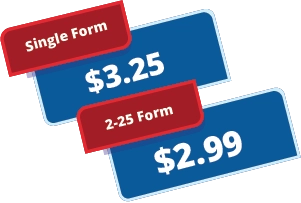
To file Form 1099-G for a single return the filing fee is $3.25.
The IRS requires Form 1099-G to be submitted by February 28 through the mail and by March 31 if you file the form electronically however, recipients’ copy should be mailed by January 31.
Yes. Filing Form 1099-G after the IRS deadline may result in penalties. The penalty is $60 per form if filed within 30 days after the deadline, $130 per form if filed more than 30 days late but by August 1, and $340 per form if filed after August 1 or not filed at all.
The maximum annual penalty can reach $4,191,500, with lower limits for qualifying small businesses. Separate penalties may also apply if recipient copies are not provided on time. The IRS may waive penalties when the filer can demonstrate reasonable cause.
Generally, you should file Form 1099-G for the appropriate tax year within the specified deadlines. Late filing may result in penalties, and it’s advisable to consult with tax professionals for guidance on specific situations.
Form 1099-G is typically issued to report various government payments, such as unemployment compensation, state tax refunds, or other government-related income. Tax2efile supports the filing of Form 1099-G for these types of payments.
If you discover an error on a filed Form 1099-G, Tax2efile provides a correction feature. You can log in to your account, select “Corrections”, and make the necessary corrections promptly.
Late filing of Form 1099-G may result in penalties imposed by the IRS. Tax2efile advises users to file their forms on time to avoid potential late fees. The specific penalty amounts can be checked on the IRS website or through Tax2efile support.
Still have questions?
If you have more questions, please refer to our FAQ page. Contact our customer support team for assistance.


